
Generating Better Tweet Previews
Tweet previews on FB Messenger are broken. Can we fix them?
Jan 12, 2025
A certain Someone’s acquisition1 of a beloved short-form stream of consciousness platform (Twitter now X, the Everything App) has introduced changes to how we share content (specifically to other social media platforms). One change that is particularly egregious (at least to me) is that sharing a link to a tweet on FB Messenger no longer generates a link preview.
What are Link Previews?
Link previews summarize the content at the link destination with a title, description, and thumbnail. Previews are generated automatically, and each social network generates them differently.
A crucial part of the tweeting/x-ing/poasting experience is being able to share your favorite tweets with friends on your Big Communication Platform™️ of choice and them being able to “engage” with the tweet without having to actually click on it.
Reducing the simplicity of this experience has made sharing tweets frustrating. (At one point, I was screenshotting a lot of tweets but that’s kind of annoying).
To contrast with Messenger, iMessage does several things natively. Pure Text Tweets are rendered up-to 280 characters. The size of the text container is content-aware. Tweets with a mix of image and text are handled intelligently. The image now occupies the traditional location and the “text content” is shown below the image along with information about who tweeted. (this is an inversion of how the actual tweet is rendered but is consistent with link previews in general).
These are all good things and that this is unavailable on Messenger is sad for us boomers.
# Contents
# Can we fix this?
So what can we actually do about this? Why, build our own Open Graph 2 metadata enabled link of course! Since we know what metadata FB Messenger expects in order to render a link preview, we can “mimic” the old twitter experience by routing the tweet through our new system.
We need a few things to make this happen -
- An OpenGraph image generator with decent customizability - Vercel has us covered with their
@vercel/oglibrary. Some of the library features that we’ll be using are -- Layouts using Flexbox and absolute positioning
- Custom fonts, text wrapping, centering
- Ability to test the OG Image and metadata in a dev environment
- A fast, edge runtime that lets us dynamically generate webpages that contain the Open Graph meta tags that FB Messenger can understand - I’ve been interested in trying out CloudFlare and their Worker runtime seemed like a great fit.
- Easy way to share tweets using the new URL - Since I mostly browse and send tweets on my iPhone, I’m going to reach for iOS Shortcuts here to substitute the tweet URL with our custom domain construction.
Knowing you can dynamically generate an OG Image is great, but to do that we need the contents of a tweet first. Normally, I’d reach for the Twitter API but that’s been paywalled for years now so I needed to find something different. Luckily, Twitter still maintains an oEmbed API that returns a simple embed HTML for a given tweet URL.
For example, if we send a GET request to https://publish.twitter.com/oembed?url=https://x.com/TwitterDev, we would receive a JSON response looking like this -
{
  "url": "https://twitter.com/TwitterDev",
  "title": "",
  "html": "<a class=\"twitter-timeline\" href=\"https://twitter.com/TwitterDev\">Tweets by TwitterDev</a>\n<script async src=\"//platform.twitter.com/widgets.js\" charset=\"utf-8\"></script>",
  "width": null,
  "height": null,
  "type": "rich",
  "cache_age": "3153600000",
  "provider_name": "Twitter",
  "provider_url": "https://twitter.com",
  "version": "1.0"
}
The piece of information that we’re most interested in there is the html, which contains the contents of the tweet. Let’s see how we can generate an image from the tweet now.
# OG Image Generation
We create a new Next.js pages project and install @vercel/og. Next, we create a new API end-point that our CloudFlare worker will call to get an image back. The API endpoint will be responsible for getting the oEmbed data and generating an image from the tweet.
Our Next.js project structure looks like this. The file that we’re interested in is api/twitter.tsx. This is where all the logic for our OG Image Generation will live.
├── package-lock.json
├── package.json
├── pages
│   ├── _app.tsx
│   ├── _document.tsx
│   ├── api
│   │   └── twitter.tsx     <-- Our Image Endpoint
│   └── index.tsx
There’s not really much to the logic to be honest. We extract the Tweet data from the HTML and make sure that some common HTML Character Entities are handled properly. Since tweets have a “maximum” length of 280 characters (they can be arbitrarily long if the user has paid for Premium 3), we enforce a length cutoff of 280 characters for our preview and add ellipses (…) at the end to communicate that the original tweet had more content.
const twitter_oembed = `https://publish.twitter.com/oembed?url=${title}&omit_script=1&lang=en`;

const resp = await fetch(twitter_oembed);
const data = await resp.json();

const domstring = parse(data.html);
image_text = decodeHtmlEntities(
	domstring.getElementsByTagName("blockquote")[0].innerText,
);

const last_emdash = image_text.lastIndexOf("— ");
const split_name_and_date = image_text
	.slice(last_emdash + 2, image_text.length)
	.split(")");
const display_name = `${split_name_and_date[0].trim()})`;
const tweet_date = split_name_and_date[1].trim();

user_info = `${display_name} | ${tweet_date}`;
image_text = image_text.slice(0, last_emdash);

return new ImageResponse(
	<div>
		<div>{user_info}</div>
		<div>{image_text}</div>
	</div>,
	{
		width: 1200,
		height: 630
	},
);
The actual Image Generation turns out to be quite simple. All our endpoint does is wrap the tweet data that we’ve parsed into a <ImageResponse /> and return it. For the sake of brevity, I’ve omitted the CSS styling that I apply to the image. But the basics are that we want an image with dimensions 1200x630 where user_info looks like @itsrainingmani | Jan 7th, 2025 and image_text is the contents of the tweet.
Ultimately, we end up with an image that looks like this -
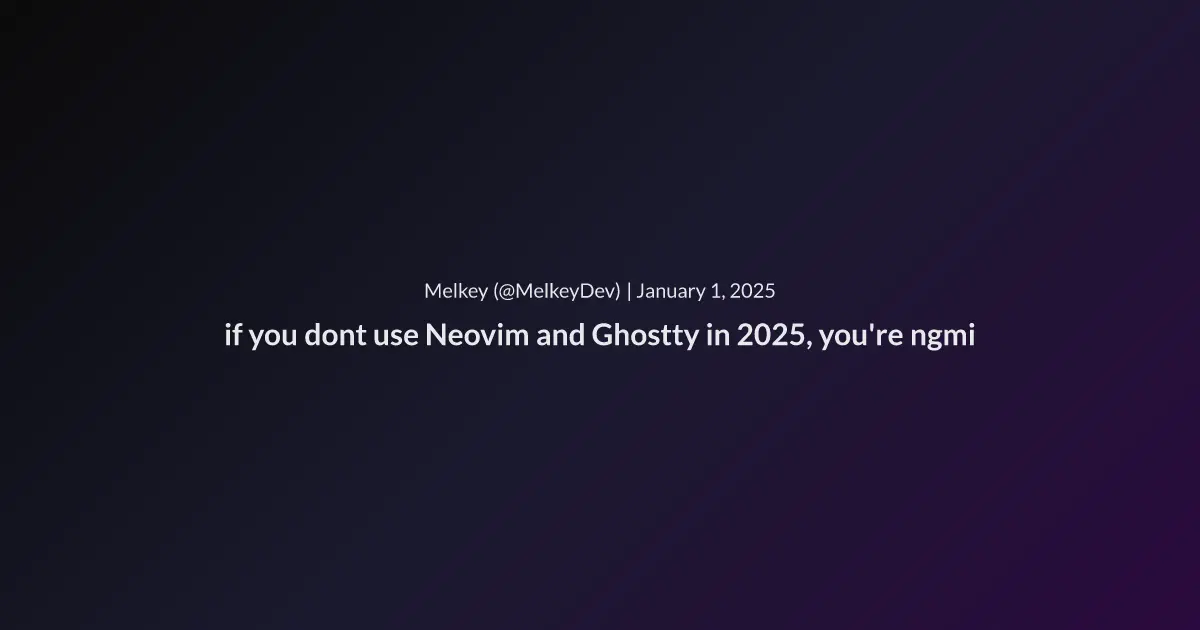
Hurray!
# Mimicking Metadata
Now that we can generate images, we need a way to quickly make a web-page with the right OpenGraph metadata in it. To do this, we’re going to use a Cloudflare Worker and the Hono framework which promises to be “Fast, lightweight, built on Web Standards” 4 and good support for the Worker Runtime.
Setting up a Hono API server is easy -
import { Hono } from 'hono'
const app = new Hono()

app.get('/', (c) => c.text('Hono!'))

export default app
We add an endpoint to handle tweets. Tweet URLs look like https://x.com/:username/status/:tweet_id. So our endpoint will mimic that (there’s a reason we do this instead of receiving the whole tweet URL as a parameter)
app.get(
  "/:username/status/:tweet_id",
  async (c) => {
    const image_api_url = c.env?.TWIT_IMAGE_URL;

    const { username, tweet_id } = c.req.param();
    const tweet_param = `https://x.com/${username}/status/${tweet_id}`;
    const twit_image = `${image_api_url}${tweet_param}`;

    return c.html(gen_meta(username, tweet_param, twit_image));
  },
  cache({ cacheName: "better-preview", cacheControl: "max-age=86400" })
);
The endpoint returns HTML using the supplied parameters and the URL of our OG Image Endpoint.
<html>
  <head>
    <meta property="og:type" content="website" />
    <meta property="og:title" content="${
      username ? `by @${username}` : `Twit`}" />
    <meta property="og:url" content="${tweet_param}" />
    <meta property="og:image" content="${twit_image}" />
		<meta property="og:image:width" content="1200" />
		<meta property="og:image:height" content="630" />
    <script type="text/javascript">
      document.addEventListener("DOMContentLoaded", (event) => {
        window.location.href = "${tweet_param}";
      });
    </script>
  </head>
  <body style="background-color:black;">
  </body>
</html>
The HTML contains the basic metadata according to the OpenGraph Protocol. The required properties are og:title, og:type, og:image & og:url and we seed these properties with our tweet data.
There’s a tiny bit of JS code in the webpage that redirects to the tweet URL when the page is loaded. This makes sense since we only care that page contains the OpenGraph metadata to generate a link preview. For any other uses, we want to send the user to Twitter.
# Usage
No side project would be complete without a nice, new domain. I found twit.rip which I think is perfect for our use case.
Finally, to use our fun, new link previews, all we have to do is replace twitter.com or x.com with twit.rip when we’re sharing to Messenger!
https://x.com/povialjunk/status/1878331860595429785
                       |
                       ↓
https://twit.rip/povialjunk/status/1878331860595429785
This is the reason we structured our Cloudflare/Hono API endpoint the way we did. We can seamlessly substitute the domain without having to send the entire tweet URL as a parameter to the API!
Now of course, we can do this manually everytime but what’s the fun in that 🙂. Since my primary device for doomscrolling Twitter is my iPhone, I’m going to make an iOS Shortcut that does the domain substitution when I’m sharing tweets. This is what the Shortcut looks like -
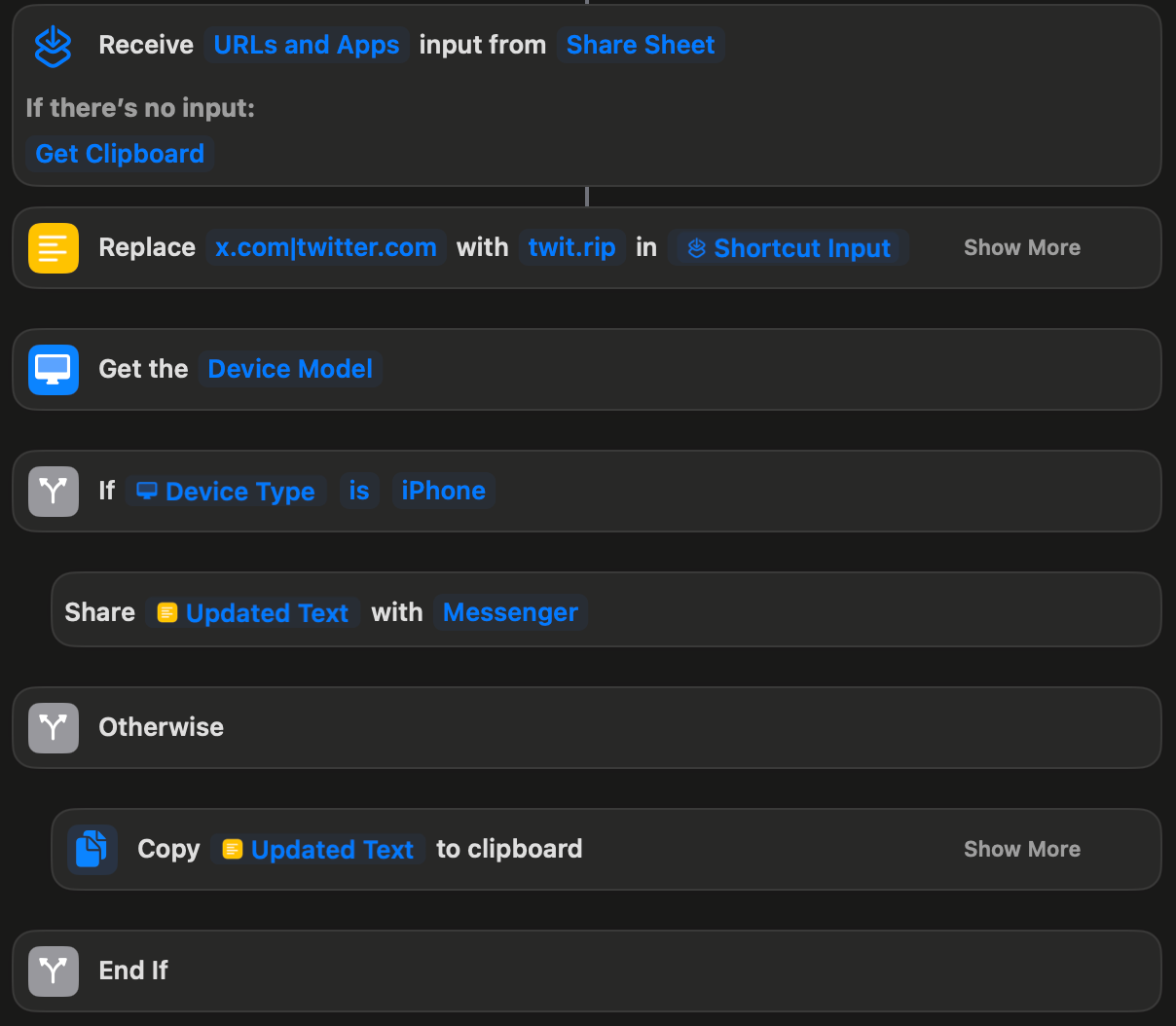
Although the shortcut is primarily meant to be used on iOS, it does work on other devices albeit in a limited fasion.
And, Voila. This is what our finished Link Preview looks like when we send a tweet in FB Messenger
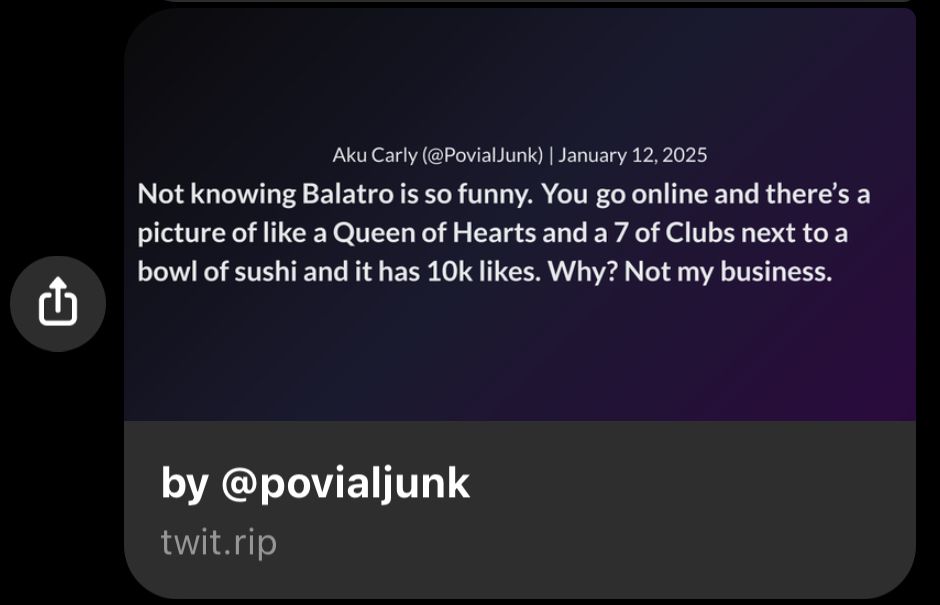
As we can see, just by replacing the domain, we get a nice preview of the content of the tweet (in this case, the whole tweet), the date of the tweet and the account tweeting it. And all it took was stringing together a couple of APIs.
This is what I love about the Web and Standards. Because there’s a common “API | Specification | Protocol” (I love saying API) for something like this, we’re able to make our own version even when a propietary system decides that it’s not expedient to do so. And that’s beautiful.
If you’re still using FB Messenger and want to share tweets that look cool and not boring, replace twitter.com or x.com with twit.rip or use my iOS Shortcut from the iOS Share Sheet to send the updated URL directly to Messenger.
Happy Poasting5!
# References
- Elon Musk acquired Twitter (now X, the everything App) on April 14, 2022. The exact date of when Link Previews on Messenger stopped working is harder to pin down but was likely around mid-2023.
- The Open Graph Protocol was initially developed by Facebook but was adopted as a web standard allowing any website to have rich functionality.
- If you have a spare $8/m, you can post up to 4000 characters
- To be quite honest, I picked Hono because it’s new, sounded cool and I wanted to play around with it. To Hono’s credit, the dev-ex has been really nice and it’s done exactly what I needed with no fuss.
- to poast - (humorous, Internet) A post on an internet site, especially associated with being “terminally online” or causing mischief.